Now that the excitement of the new Management API launch has just passed its zenith, you might have also noticed that there were some interesting changes to the Analytics for Developer pages on Google Code.
Since Nick, Alex, and I were under the hood making docs and sample code for the Management API, it also seemed like a good time to spiff up the site and add some structure to handle this burgeoning developer resource.
New Look and Feel
Nick went to town on our new home page. If you attended his talk at the Google I/O conference this May, you might notice that the Analytics data model diagram has reappeared, but this time as a gateway into the key parts of our documentation on Google Code. We surfaced the most important links to provide deep access to the key parts of each section of the site. New Landing Pages
Since we now have 3+ major sections on our site, it was time to provide landing pages for all the news and updates relevant to Tracking Code configuration, Management API, and Export API. Here you will always be able to see the latest release news and best practice guides for each API without having to dig down into the site.
We’ve also redesigned our navigation bar to be more visually appealing and consistent across all three APIs.
New Groups Pages
We have three major developer groups to help you out with your Analytics coding--Async tracking, Management API, and Export API. Not only that, but our general Help Forum is great for issues with general tracking topics. Since we have so many different groups, we created a new groups landing page to help you figure out which group will help you best.
Our Management API and Export API groups use the new Google Discussion Forum, which is embedded right in the page--a pretty nifty feature.
We hope that you find the new design makes it clearer and easier for you to find what you need for Analytics development. We’d love to hear your feedback, so please post any comments on one of our developer groups pages and let us know.
Patricia Boswell on behalf of the Analytics API team.
A Better Developer Doc Experience
Label: Adsense |

This Blog Google Blogs Web Blog News This Blog Google Blogs Web Blog News Creating Targeted Tests using Doub
Label: Adsense |Testing is probably the most effective way to optimize websites. Through testing we can understand what our customers like, which ultimately will help us create a better customer experience for our audience. But "our audience" is usually not a unique type of person; it is important use techniques such as Test Segmentation to understand the differences in the tastes of each cluster of customers.
However, where can you get ideas for tests? How do you choose, for example, if you should use an image of a man, a woman, a couple, a baby or a family? Most of us do not have the privilege of testing the YouTube homepage: traffic is limited for most sites, so it is important to run tests that have a high chance of making a difference. We have to focus our efforts on our best guesses. In this post, we will show a way to use DoubleClick Ad Planner to research for testing ideas that will be tailor made to the segments you are trying to target in your website.
Finding Your Audience on Ad Planner
In a recent blog post on the DoubleClick Advertiser Blog, the DoubleClick Ad Planner mission is described as:
...to provide the deepest, most accurate insight into online audiences possible. This insight helps display advertisers select the best sites for their media plans and drive results for their campaigns.However, I believe this description is missing an important part, which is not less important to advertisers: to understand your audience tastes and which kind of websites they like. The DoubleClick Ad Planner provides important insights into how to design your campaign landing pages and your website at all.
So, let's suppose I am working to optimize the eMetrics Summit website for the San Francisco conference in 2011. The Summit targets marketing managers, web analysts and business intelligence experts that are trying to understand how to increase the return on online investments. Here is how to find the tastes and preferences of this audience:
- Sign in to DoubleClick Ad Planner and create a new Media plan;
- Go to Research tab, choose the Research by Audience secondary tab;
- Choose among the various segmentation options in order to narrow the audience and the websites they visit. Below are the segments chosen for eMetrics San Francisco audience:
- Geography: chose country USA and refined it to include only West Coast states. That's the main target for this show since eMetrics also hosts a Washington DC conference
- Demographics: included both males and females, between 25 and 44 years old, with at least a bachelor degree, with a household income above $75K. I think this segment is very close to the audience of the conference (but I have no inside information)
- Online Activity: chose a large website that the audience is likely to visit: Google Analytics
- Interests: chose everything under 'Business' and 'Computers & Electronics'
- Ranking Method: chose the ranking method to be 'Best Match' since we are not doing this analysis in order to find a place to advertise (in which case we might sort the websites by reach), but to find a place that our target likes to visit
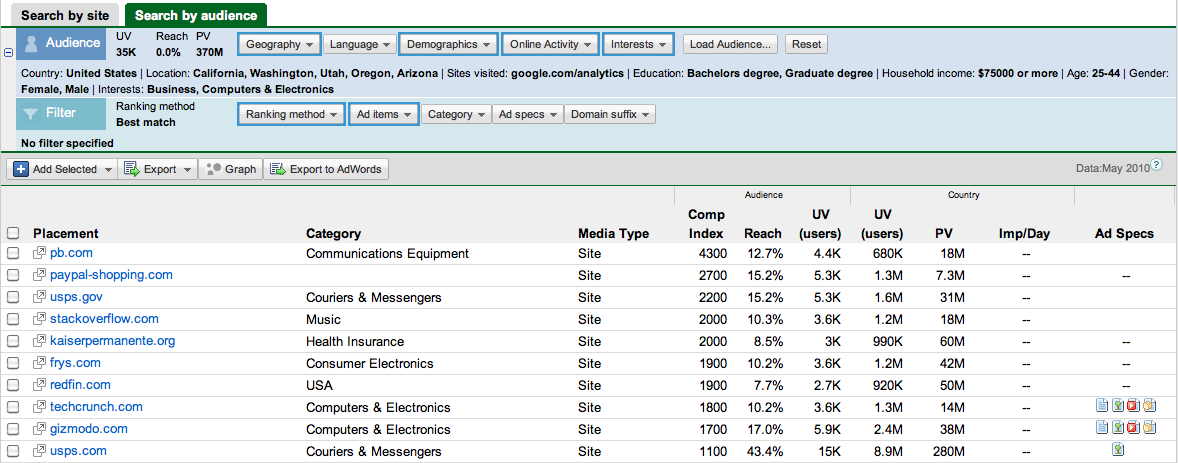
Once we find the "Website Testing Inspiration" table, which shows the websites where our targeted audience is surfing around, we have the raw material necessary to get ideas for our testing efforts. Continuing our example above, we can visit the websites in the Top 10 websites that match our audience and start analyzing them.
So, here are a few insights from the analysis above for the eMetrics San Francisco home:
- First of all, looks like Jim Sterne chose the right color, blue is very prominent in all the websites;
- Idea #1: it could be worth a try to add some geeky machines to the page, such as in the Pitney Bowes, Kaiser Permanente and Frys websites;
- Idea #2: call these companies and have someone present at eMetrics and feature it at the conference homepage;
- Idea #3: submit a post to both TechCrunch and Gizmodo, which would certainly be happy to feature interesting content about social media metrics. The posts would be useful in order to promote the conference and, in terms of testing, the eMetrics homepage could try featuring in a prominent place that the conference is being quoted in these websites (something like "In the news");
- Idea #4: interesting to see that Stack Overflow is number 5 on the list, a website for "professional and enthusiast programmers". It looks like many technical people are inside this audience. Maybe it could be worthwhile to try showing a classification on the site targeting different types of people: "Programmers only talks", "Business Minded talks", "Marketers, Statisticians and liars"...
Bonus: Instead of looking for your audience and which sites they visit, you can also look into your competitors' sites and understand which segments they are attracting that you are not. Read more about it on Avinash's post: Competitive Intelligence Analysis: Google / DoubleClick Ad Planner.
Adsense for Feeds
Label: Adsense |Ever since Google bought Feedburner they have been working towards placing Adsense on the Feedburner feeds. No surprise there as G needs to keep growing and Adsense/Adwords is what feeds the beast. A few months back Feedburner made Adsense available and I attempted to try it but for what ever reason it didn't work. No doubt I screwed things up - not a surprise either as most of you know I am not technically gifted and spent about 5 seconds trying to figure out what went wrong before ditching the whole works.
Long story short - a few days ago I noticed a new link on my Adsense Overview page (see image below) which is entitled Adsense for Feeds. Of course it may have been there for a while and I just didn't notice it until now.
Click Image to enlarge
Needless to say I clicked the "Get Started" button. I was taken to the following page.
Click Image
Naturally it told me that I had no feeds in my account and gave me a link to "View our Account Migration Guide". Apparently you will have to have Google migrate all your feeds from Feedburner to Adsense. Turns out this isn't complicated.
Click Image
In fact Google will do it for you. This is right up my alley - anytime I can get someone else to do the tech stuff suits me just fine. Just ask my good friend Terry! Just give Google your Feedburner username and provide your Adsense email address and they will do the necessary steps for you.
So I did and am waiting to see what happens next.
Now I'm telling all you folks this because should things work out all of my feed subscribers will be snarling and nashing their teeth as soon as the Adsense ads start appearing on my feeds. Before you all hit the unsubscribe button please hear me out.
This whole Adsense on Feeds thing has me more than curious as it just doesn't fit in with Google's current policies. How are they going to assure quality clicks for the Advertisers? At present they frown on too many clicks coming from the same IP. One of the things you have to be careful of is that some of your readers may try and help you by clicking your ads repeatedly. This doesn't help at all and can get your account banned. Clicks have to be natural and repeated clicks from the same IP is not natural.
However, if I have Adsense on my Feeds then I am only going to get clicks from my readers. Search traffic will not see these ads. Presumably G wants my readers to click the ads - if not then why offer the service. So does this mean that they won't mind the same people clicking ads on a more frequent basis? They can hardly penalize me for repeated clicks when my pool of readers is limited. This, in a nutshell, is what I want to find out. In one sense my readers are highly targeted for my keywords and Google likes that. I suppose they feel this will benefit the Advertisers - maybe it will. On the other hand this just seems ripe for abuse and I am curious as to how G plans on counting clicks. Which will they consider valid and which will be considered suspect?
I am asking you dear readers not to get all un-subscribe on my ass when the ads appear as I simply want to see how this program is going to be monitored by Google. I will certainly keep you abreast of my findings. I should also say that this is not a call to entice you to click those ads. Please, please, please... don't unless it is something you really are interested in. I have no wish to game Adsense in any way and you shouldn't either. I suspect that my readers will ignore them in the same way they ignore the ads on my blog - just background noise that bloggers tend not to notice. I understand why search traffic clicks ads - I don't understand why targeted feed subscribers ever would though. And I don't understand why Google thinks they would either.
In any event you now know up front what I'm up too and I hope you will not get offended when you see the ads. Just another little experiment and I'll fill you in when I get some results.
Adsense For Domain Fitur Terbaru GA
Label: Adsense |lagi rame seperti tahun dulu, tapi gak apalah yang penting bisa update blog. Kemarin ketika mau cek earning di Account Google Adsense aku sempat kaget dan penasaran, ternyata Google Adsense menambahkan satu fitur baru lagi yaitu Adsense for Domain. Awalnya bingung, kawatir, was-was, karena aku tidak tahu untuk apa dan bagaimana fitur yang satu ini digunakan.
Sempat aku browsing cari referensi mengenai Adsense For Domain, dan ternyata Adsense For Domain merupakan layanan bagi publisher yang mempunyai Domain yang nganggur alias sudah tidak diurus. Kalu yang lebih kerennya Domain Parking. Nah bagi kamu yang mempunyai domain yang sudah tidak diurus dan mempunyai trafik yang tinggi mending kamu suruh Google Adsense saja untuk mengurusnya. Dijamin terurus kalau GA mau….
Nah sebelum kamu ikutan Adsense For Domain mending kamu baca dulu TOS awal supaya bisa yakin… Ikutan gak ya…!!!??
PLEASE READ VERY CAREFULLY THESE TERMS AND CONDITIONS AND THE FAQ BEFORE REGISTERING FOR THE GOOGLE ADSENSE FOR DOMAINS PROGRAM. PARTICIPATION IN THE GOOGLE ADSENSE FOR DOMAINS PROGRAM INDICATES THAT YOU ACCEPT THESE TERMS AND CONDITIONS. IF YOU DO NOT ACCEPT THESE TERMS AND CONDITIONS, PLEASE DO NOT REGISTER FOR OR PARTICIPATE IN THE GOOGLE ADSENSE FOR DOMAINS PROGRAM.
Introduction. This agreement (“Agreement”) between You and Google Inc. (“Google”) consists of these Google AdSense for Domains Program (the “AFD Program”) Standard Terms and Conditions (“AFD Terms and Conditions”) and the Google AdSense Online Program Standard Terms and Conditions (“AdSense Online Terms”), located at https://www.google.com/adsense/static/en_US/LocalizedTerms.html or such other URL as Google may provide from time to time. A description of the AdSense Online Program, as generally offered by Google, is available at the Program Frequently Asked Questions (“FAQ”) URL, located at https://www.google.com/adsense/faq, or such other URL as Google may provide from time to time. “You” or “Publisher” means any entity identified in an enrollment form submitted by the same or affiliated persons, and/or any agency or network acting on its (or their) behalf, which shall also be bound by the terms of this Agreement. Any capitalized terms not defined herein shall have the meaning set forth in the AdSense Online Terms. For the avoidance of doubt, the term “Program” as defined in the AdSense Online Terms shall include the AFD Program.
1. AFD Program Participation. Your participation in the AFD Program is subject to your continued compliance with the AdSense for Domains Program Policies located at https://www.google.com/adsense/support/bin/answer.py?answer=96332&topic=14746, and/or such other URL as Google may provide from time to time.
2. Implementation and Operation of AdSense for Domains. All Ads (including Ads served in response to end user clicks on, and queries entered into, Links, if any) will be grouped by Google and displayed with Links (where applicable) to end users of the Property(ies) as Ad Unit(s) in standard formats as offered generally by Google from time to time, as may be further described in the FAQ. You may select a format approved by Google for the display of Ad Units in connection with the Property(ies), but You acknowledge and agree that Ads and/or Links: (i) shall only be displayed in connection with the Property(ies), each of which is subject to review and approval by Google in its discretion at any time; and (ii) shall be subject to the placement guidelines set forth in the AdSense Online Terms. Except for related Google queries and end user license and queries entered into Links, all queries must originate from individual human end users inputting a URL directly into the address bar of an Internet browser. You will send any and all such URL queries (without editing, filtering, truncating, appending terms to or otherwise modifying such queries individually or in the aggregate) to Google and Google will use commercially reasonable efforts to provide You with corresponding Ads, as applicable and as available. Ads will be displayed on Web pages hosted by Google (each an “AFD Page”) and the format, look and feel of those Web pages hosted by Google may be modified by Google from time to time.
3. Labeling, Branding and Attribution. Notwithstanding anything to the contrary in the AdSense Online Terms or Program Policies, Ads provided by Google pursuant to the AFD Program will not include any Google labeling, branding or attribution.
4. Prohibited Use. In addition to Your obligations set forth in Section 5 of the AdSense Online Terms, You shall not, and shall not authorize or encourage any third party to: (a) use the AFD Program in conjunction with any downloadable application, including, but not limited to, toolbars; (b) allow Your content to lead an end user to another parked domain page or search portal; (c) submit domains to the AFD Program that violate any trademark (and related rights), copyright, trade secret, patent or other intellectual property right of any third party; and (d) implement on any AFD Page a third party advertising service which is the same as or substantially similar in nature to the AFD Program. You acknowledge that any attempted participation or violation of any of the foregoing is a material breach of this Agreement and that we may pursue any and all applicable legal and equitable remedies against You, including an immediate suspension of Your account or termination of this Agreement, and the pursuit of all available civil or criminal remedies.
5. Representation and Warranties. In addition to Your representations and warranties set forth in Section 13 of the AdSense Online Terms, You further represent and warrant that (a) You are (and will remain at all times during which such domain implements the AFD Program) the exclusive and official registrant of each domain submitted to the AFD Program; (b) there are no actions, suits, claims, or proceedings of any nature (including any governmental or regulatory investigations) pending, or threatened, against You, Your assets and properties, employees, affiliates, agents, or any of Your respective officers or directors (each a “Claim” and collectively, “Claims”), and You agree to notify the Google Legal Department of any and all Claims immediately upon Your awareness of such Claim; and (c) the information provided by You to Google sets forth a complete and accurate list of all names under which You have ever conducted business, and that You will update such list promptly in the event You conducts business under any other name(s) during the Services Term .
May, 2008
By checking this box and clicking on the I Accept button, you agree that you have read, understand and accept the Terms and Conditions, the Program Policies, and the Frequently Asked Questions for participation in Google AdSense for Domains. If you do not agree to these Terms and Conditions, you will not be able to participate in this program.
Nah itu Mungkin TOS atau Peraturan sebelum kamu mengikuti Produk terbaru dari Google Adsense… bingung ??, ya..iya lah bahasanya asing kan nah kalau kamu yang gak ngerti bahasa asing… :)) mending kamu baca hasil terjemahan kasar yang sempat aku terjamakan buat kamu…
Google AdSenseTM untuk Domain Standar Program Syarat dan Kondisi
PLEASE READ INI SANGAT SEKSAMA PERSYARATAN DAN KETENTUAN DAN Tanya sebelum mendaftar ATAS GOOGLE AdSense untuk Domain PROGRAM. PARTISIPASI DI GOOGLE AdSense untuk Domain PROGRAM menunjukkan bahwa Anda ACCEPT PERSYARATAN DAN KETENTUAN INI. IF YOU DON’T ACCEPT PERSYARATAN DAN KETENTUAN INI, PLEASE DON’T DAFTAR UNTUK atau berpartisipasi dalam Google AdSense untuk Domain PROGRAM.
Pendahuluan. Perjanjian ini ( “Perjanjian”) antara Anda dan Google Inc ( “Google”) ini terdiri dari Google AdSense untuk Domain Program (the “Program AFD”) Standar Syarat dan Ketentuan ( “Persyaratan AFD dan Kondisi”) dan Google AdSense Online program Standar Persyaratan dan Ketentuan ( “Persyaratan Online AdSense”), yang terletak di https: / / www.google.com / adsense / static / en_US / LocalizedTerms.html atau URL serupa lainnya yang mungkin disediakan Google dari waktu ke waktu. J keterangan AdSense Online Program, seperti yang biasanya ditawarkan oleh Google, tersedia di Program yang Sering Diajukan ( “FAQ”) URL, terletak di https: / / www.google.com / adsense / faq, atau URL serupa lainnya sebagai mungkin disediakan Google dari waktu ke waktu. “Anda” atau “Penerbit” berarti setiap entitas yang diidentifikasi dalam formulir pendaftaran yang diajukan oleh yang sama atau orang terkait, dan / atau lembaga atau jaringan yang pada (atau mereka) nama, yang juga akan terikat dengan ketentuan dalam Perjanjian ini . Setiap persyaratan kapital tidak didefinisikan di sini akan memiliki arti yang diatur dalam AdSense Online Syarat. Untuk menghindari keraguan, istilah “Program” sebagaimana ditetapkan dalam AdSense Online Syarat harus menyertakan Program AFD.
1. Partisipasi Program AFD. Partisipasi Anda dalam Program AFD tunduk anda sesuai dengan AdSense untuk Domain Kebijakan Program terletak di https: / / www.google.com/adsense/support/bin/answer.py?answer=96332&topic=14746, dan / atau URL serupa lainnya yang mungkin disediakan Google dari waktu ke waktu.
2. Pelaksanaan Operasi dan AdSense untuk Domain. All Ads (termasuk Kemarin menjabat sebagai respons atas klik pengguna akhir, dan dimasukkan ke dalam query, Link, jika ada) akan dikelompokkan oleh Google dan ditampilkan dengan Link (apabila ada) untuk pengguna akhir dari Property (ies) sebagai Ad Unit ( s) dalam format standar yang biasanya ditawarkan oleh Google dari waktu ke waktu, karena mungkin akan lebih dijelaskan di FAQ. Anda dapat memilih format yang disetujui oleh Google untuk menampilkan Unit Iklan yang berkaitan dengan Property (ies), tetapi Anda mengetahui dan menyetujui bahwa Iklan dan / atau Link: (i) hanya akan ditampilkan dalam kaitannya dengan Property (ies) , masing-masing yang perlu ditinjau dan disetujui oleh Google dalam kebijakan setiap saat, dan (ii) wajib mengikuti panduan penempatan yang ditetapkan dalam Persyaratan AdSense Online. Google terkait kecuali permintaan dan lisensi pengguna akhir dan permintaan yang dimasukkan ke dalam Link, semua permintaan harus berasal dari pengguna akhir perorangan manusia memasukkan URL langsung ke address bar dari browser internet. Anda akan mengirim setiap dan semua URL query (tanpa editing, filtering, truncating, Menambahkan istilah untuk memodifikasi atau permintaan seperti itu secara individu atau dalam gabungan) ke Google dan Google akan menggunakan upaya komersial yang wajar untuk memberikan Anda sesuai dengan Iklan, dan berlaku sebagai sebagai tersedia. Iklan akan ditampilkan pada halaman Web-host oleh Google (masing-masing yang “AFD Halaman”) dan format, tampilan dan nuansa halaman Web yang dihosting oleh Google dapat dimodifikasi oleh Google dari waktu ke waktu.
3. Labeling, Branding dan Attribution. Meskipun apapun yang bertentangan dalam AdSense Online Istilah atau Kebijakan Program, Iklan yang disediakan oleh Google sesuai dengan Program AFD tidak akan menyertakan label Google, merek atau atribusi.
4. Gunakan dilarang. Selain kewajiban Anda diatur dalam Pasal 5 dari AdSense Online Terms, Anda tidak akan, dan tidak akan mengotorisasi atau mendorong pihak ketiga manapun untuk: (a) menggunakan Program AFD sehubungan dengan download aplikasi, termasuk namun tidak terbatas ke, toolbar, (b) membolehkan Anda untuk konten yang mengarah ke pengguna akhir domain terparkir halaman portal atau cari, (c) menyerahkan domain ke AFD Program yang melanggar merek dagang (dan yang terkait dengan hak-hak), hak cipta, rahasia dagang, paten atau hak kekayaan intelektual lainnya dari pihak ketiga, dan (d) melaksanakan AFD Halaman pada pihak ketiga adalah layanan iklan yang sama atau serupa dalam sifat substansial ke Program AFD. Anda mengetahui bahwa setiap berusaha partisipasi atau melanggar salah satu dari bahan yang sebelumnya adalah pelanggaran Perjanjian ini dan bahwa kami dapat melakukan setiap dan semua hukum yang berlaku adil dan solusi terhadap Anda, termasuk segera penskorsan dari account atau penghentian Perjanjian ini, dan pengejaran yang semua tersedia remedies pidana atau perdata.
5. Perwakilan dan Jaminan. Selain Anda membuat pernyataan jaminan dan diatur dalam Pasal 13 dari AdSense Terms Online, Anda juga menyatakan dan menjamin bahwa (a) Anda (dan akan tetap sepanjang waktu seperti yang selama domain yang melaksanakan Program AFD) yang eksklusif dan pejabat pendaftar setiap domain yang dikirimkan ke Program AFD, (b) tidak ada tindakan, sesuai, klaim, atau suatu proses alam (termasuk pemerintah atau peraturan penyelidikan) tertunda, atau terancam, terhadap Anda, Anda dan aset properti, karyawan, afiliasi , agen, atau Anda masing-masing petugas atau direktur (masing-masing yang “Klaim” dan secara kolektif, “Klaim”), dan Anda setuju untuk memberitahukan Google Departemen Hukum setiap dan semua klaim segera setelah Anda kesadaran
PERATURAN GOOGLE ADSENSE
Label: Adsense |Apakah anda selama ini selalu gagal mendaftar di Adsense ? lalu, apa permasalahan anda sehingga selalu di tolak oleh Adsense sebagai publisher ? Mungkin saya bisa memberikan solusinya.
Pengalaman saya beberapa kali ditolak oleh Google Adsense saat mendaftar sebagai publisher, yah akhirnya setelah berbagai cara akhirnya diterima juga.
Bagi yang belum tahu apa itu Adsense, saya jelaskan secara singkat:
Google Adsense adalah salah satu cara / solusi mencari duit / uang di internet, jadi , kita dibayar karena website kita menampilkan iklan yang berupa potongan script yang ditempelkan di situs kita.
Tentang cara / mekanisme iklan itu bekerja, untuk sementara anda tidak perlu tahu, yang penting saya memberikan solusi / tips supaya anda bisa diterima secara cepat / kilat hanya dalam 1-3 hari, malahan mungkin dalam hitungan kurang dari 24 jam (…itu berdasarkan pengalaman saya lhoo..)
Mungkin agak tricky apa yang saya tulis di artikel ini , tetapi it’s ok lah .. selama kita bisa mencari devisa buat negara kita.
Langkah-langkah yang mesti anda perhatikan adalah:
[a] Apakah anda sudah pernah ditolak setelah mendaftar sebelumnya ke Google Adsense ?
Jika pernah, apa yang menjadi masalah / alasan mereka ketika situs anda di tolak ?
Apakah situs anda berbahasa Indonesia ?
Jika ya, bukan masalah, anda bisa mendaftar lagi….
Jika tidak, lalu apakah situs anda berisi content pornografi ?
Jika ya, lalu apakah situs anda berada di blogspot / blogger ?
Jika situs anda ditolak karena berisi content pornografi yang berada di blogspot / blogger, LUPAKAN UNTUK MENDAFTAR KEMBALI DENGAN ALAMAT YANG SAMA. Gunakan alamat lain untuk mendaftar kembali.
[b] Anggap saja anda tidak pernah mengenal apa itu Adsense, dan tidak pernah mendaftar sebelumnya. Saya akan berikan tips kilat kepada anda. Langkah-langkah yang perlu ambil supaya mudah di approve Google Adsense sebagai publisher adalah :
1. Bikin account di Blogger, caranya, kunjungi :
http://www2.blogger.com/
2. pilih “CREATE YOUR BLOG NOW”
3. Isi form data2 anda dari email address, Password, Display Name, Word Verification, dan centang Acceptance of Terms sebagai persetujuan anda mengikuti aturan mereka.
4. Beri judul Blog anda, dan berikan nama URL alamat blogspot anda.
5. Pilih template yang cucok dengan selera anda.
6. Setelah itu “START POSTING” artikel baru ?
Tunggu dulu….
7. Jika anda yang tidak fasih dalam bahasa inggris atau mengalami kesulitan mencari ide, lebih baik anda COMOT dari Internet Artikel-artikel yang berbahasa Inggris.
Saya pakai istilah PINJEM, bukan NYOLONG artikel, karena begitu SITUS BLOGGER kita diapprove google adsense, anda bisa hapus dan ganti dengan artikel berbahasa Indonesia.
8. Setelah “MEMINJAM” artikel orang lain di internet, baru START POSTING..
9. Muntahkan semua artikel yang baru anda “PINJEM” dari orang lain yang berbahasa Inggris ke artikel pertama anda.
Ingat : USAHAKAN NYARI ARTIKEL YANG PANJANG (walaupun anda tidak tahu apa isinya)
Saran saya : comot dari wikipedia atau answer.com, atau lebih baik, di campur aduk (jaga2 siapa tahu sekarang Google mempunyai teknik baru dalam melacak copyright artikel lain di internet).
10. Setelah postingan artikel pertama anda berhasil, mulailah sign up / register / daftar dengan klik gambar button di atas.
Daftarlah dari gambar berlogo Google Adsense (klik dari gambar),
kemudian pilih BUTTON: CLICK HERE TO APPLY seperti gambar dibawah:
dan lengkapi data diri anda di formulir isian yang nantinya disodorin mereka. Hati-hati dalam pengisian, biasanya kita terjebak saat mengisi WEBSITE LANGUAGE kita, lebih baik kita memilih ENGLISH, karena kalau anda mengisi website anda berbahasa Indonesia, anda akan di tolak mereka.
11. Jangan lupa juga isi nomor telepon anda di mulai dengan prefix 62, misalnya nomor telpon anda 02167424433, maka isilah nomor telp dengan 622167424433
12. Anda akan dikirimkan email notifikasi bahwa anda adalah pemilik sah EMAIL yang anda daftarkan, kemudian anda disuruh mengclick URL yang dikirimkan mereka.Setelah itu ….
13. Centang semua jika muncul :
AdSense applicants must agree to adhere to AdSense program policies (details)
I agree that I will not click on the Google ads I’m serving through AdSense.
I will not place ads on sites that include incentives to click on ads.
I agree that I can receive checks made out to the payee name I have listed above.
I will not place ads on sites that include pornographic content.
I certify that I have read the AdSense Program Policies.
14. Centang pilihan pertama jika muncul :
Would you like to have a single account for all Google services?
You can use your existing Google account email address and password for AdSense as well. Or you can choose new ones just for AdSense.
1. I’d like to use my existing Google account for AdSense.
2. I’d like to choose a new login name and password just for AdSense.
Setelah itu akan muncul KOTAK isian LOGIN, lalu loginlah dengan username dan password yang sama dengan username / password yang anda daftar di WWW2.BLOGGER.COM itu.
13. Tunggu email dari mereka beberapa hari kemudian, yang berisi “CONGLATURATIONS !!”
Peraturan Tentang Google Adsense
Tulisan berikut diambil dan diterjemahkan dari halaman Google AdSense Program Policies dengan tujuan untuk memudahkan publisher AdSense Indonesia untuk memahami dan mengerti aturan2 yg diterapkan oleh Google berkaitan dengan program Google AdSense mereka. Setiap pelanggaran aturan yg dilakukan oleh publisher, sekecil apapun, akan dapat menyebabkan keanggotaan AdSense mereka dihapus oleh Google.
Sekedar informasi, artikel berikut ditulis berdasarkan update ketentuan Google AdSense Program Policies pada bulan Januari 2007. Sewaktu-waktu, Google akan melakukan perubahan/penambahan/pengurangan aturan mereka, jadi untuk informasi yg lebih up-to-date, silahkan langsung mengacu pada halaman Program Policies mereka.
Semoga bermanfaat!
Klik dan Impresi Yg Tidak Valid
Segala klik pada ad units harus berasal murni dari keinginan pengunjung. Berbagai cara untuk menciptakan klik atau impresi pada ad units secara keras tidak diperbolehkan. Ini meliputi, tapi tidak terbatas pada, klik atau impresi berulang yg dilakukan secara manual maupun otomatis, penggunaan layanan pihak ketiga yg menghasilkan klik atau impresi seperti program paid-to-click, paid-to-surf, autosurf, dan click exchange / click club, ataupun software yg sejenis. Sebagai catatan, melakukan klik terhadap ad unitsi sendiri juga dilarang. Segala bentuk pelanggaran terhadap aturan ini dapat mengakibatkan keanggotaan AdSense Anda dihapuskan.
Mendorong Terjadinya Klik
Untuk meyakinkan hasil yg optimal baik bagi pemasang iklan maupun pengunjung situs, publisher tidak diperbolehkan untuk meminta pengunjung mengklik iklan AdSense yg ada pada situs mereka ataupun menggunakan cara2 yg tersembunyi untuk menghasilkan klik. Jika dijabarkan, publisher AdSense:
* Tidak diperbolehkan untuk mendorong pengunjung mengklik ad units mereka dengan menggunakan kata2 seperti “click the ads,” “support us,” “visit these links,” dan kata2 lain yg sejenis.
* Tidak diperbolehkan untuk menarik perhatian pengunjung ke iklan yg ada dengan menggunakan panah atau gambar2 lain yg sejenis.
* Tidak diperbolehkan untuk meletakkan gambar di sekitar ad units yg dapat membuat pengunjung mengira bahwa gambar tersebut adalah bagian dari iklan.
* Tidak diperbolehkan untuk mempromosikan situs yg memasang ad units AdSense melalui spam ataupun cara2 yg tidak benar pada situs lain.
* Tidak diperbolehkan untuk memberi komisi kepada pengunjung untuk mengklik iklan ataupun melakukan search pada Google For Search.
* Tidak diperbolehkan untuk memasang label di atas ad units AdSense yg dapat menyebabkan kesalahpahaman. Sebagai contoh, ad units boleh ditandai dengan “Sponsored Links”, tapi tidak dengan “Favorite Sites”.
Isi Situs
Publisher hanya diperbolehkan untuk memasang iklan AdSense pada situs2 yg mengikuti aturan Google, selain itu, iklan tidak boleh dipasang pada halaman dimana isi utamanya menggunakan bahasa yg tidak didukung oleh Google AdSense (termasuk Indonesia).
Ad unit AdSense tidak boleh dipasang pada situs yg mengandung:
* Kekerasan, rasis, atau saran untuk melawan/membenci orang lain, grup, maupun organisasi.
* Pornografi dan hal2 yg bersifat dewasa.
* Hacking/cracking.
* Obat2an terlarang.
* Kata2 kotor yg berlebihan.
* Judi dan kasino.
* Ajakan atau tawaran komisi/kompensasi kepada pengunjung untuk mengklik iklan atau tawaran, melakukan search, membrowsing situs (autosurf, paid-to-surf, dll), maupun membaca email (paid-to-read email).
* Penggunaan kata kunci yg berulang, berlebihan, maupun tidak relevan dengan situs, baik pada content maupun kode halaman (HTML).
* Menipu atau memanipulasi isi halaman untuk meningkatkan ranking mesin pencari dari situs yg bersangkutan.
* Menjual atau menawarkan senjata maupun amunisinya.
* Menjual atau menawarkan bir atau minuman dengan kadar alkohol tinggi.
* Menjual atau menawarkan rokok atau produk2 yg berhubungan dng rokok.
* Menjual atau menawarkan obat2an terlarang.
* Menjual atau menawarkan replikasi atau imitasi dari suatu produk.
* Menjual atau menawarkan tugas kuliah, skripsi, dan sejenisnya.
* Berisi atau mempromosikan hal2 yg bersifat ilegal / melanggar hukum.
Materi Yg Dilindungi Hukum
Publisher tidak diperbolehkan untuk memasang ad units AdSense pada situs yg berisi materi2 yg dilindungi oleh hukum, kecuali mereka memiliki ijin untuk itu. Hukum yg digunakan adalah hukum DMCA, mengenai digital media.
Aturan Webmaster
Publisher AdSense diwajibkan untuk memenuhi aturan kualitas webmaster yg tercantum pada http://www.google.com/webmasters/guidelines.html.
Penggunaan Situs dan Iklan
Situs yg menggunakan iklan AdSense disarankan untuk memiliki navigasi yg mudah untuk pengunjung dan tidak mengandung pop-up yg berlebihan. Pemasangan kode AdSense juga harus sesuai dengan yg diberikan, tanpa adanya modifikasi apapun. Ini termasuk tidak diperbolehkannya untuk mengubah perilaku / cara kerja iklan dalam bentuk apa pun.
* Situs yg menggunakan ad units AdSense tidak boleh menggunakan pop-up atau pop-under yg mengganggu pengunjung, menarik minat pengunjung, merubah setting browser, me-redirect pengunjung ke situs lain, maupun melakukan proses download.
* Kode AdSense harus dipasang sesuai dng yg diberikan tanpa adanya modifikasi. Publisher tidak diperbolehkan untuk mengubah bagian apapun dari kode tersebut atau merubah cara kerja kode, pentargetan, ataupun penampilan iklan. Sebagi contoh, klik pada iklan AdSense tidak boleh terbuka pada jendela browser baru.
* Situs atau suatu perusahaan tidak diperbolehkan untuk menampilkan iklan AdSense, search box AdSense, hasil pencarian, dan tombol referral pada aplikasi / software apapun, termasuk toolbar.
* Situs yg menggunakan iklan AdSense tidak boleh mendapatkan trafik dari situs / software lain dengan cara2 yg tidak alami, seperti pop-up, redirect, dan sejenisnya.
* Penawaran referral harus dilakukan tanpa adanya tawaran atau perjanjian tertentu dengan pengunjung. Publisher juga tidak diperbolehkan untuk meminta alamat email dari pengunjung yg menjaid referral AdSense mereka.
Penempatan Iklan
AdSense menawarkan beberapa format iklan yg dapat digunakan oleh publisher. Publisher disarankan untuk bereksperimen dengan berbagai penempatan iklan, tanpa melanggar aturan2 berikut:
* Maksimal tiga ad units dalam satu halaman.
* Maksimal dua search box Google AdSense for Search dalam satu halaman.
* Maksimal satu link units dalam satu halaman.
*
* Maksimal dua referral units dari masing2 produk referral yg ada.
* Hasil pencarian AdSense for Search hanya boleh ditampilkan pada halaman yg mengandung maksimal satu link units.
* Tidak diletakkan pada pop-up, pop-under, maupun email.
* Tidak ada elemen halaman apapun yg menutupi sebagian/seluruh bagian iklan.
* Iklan AdSense apapun tidak boleh diletakkan pada halaman yg tidak berisi apa2.
* Iklan AdSense apapun tidak boleh diletakkan pada halaman yg dibuat sepenuhnya dalam rangka untuk menampilkan iklan (MFA), tidak peduli apakah isi halaman tersebut relevan atau tidak.
Iklan atau Layanan Dari Pihak Lain
Untuk menghindari kebingungan pengunjung, Google tidak memperbolehkan untuk memasang iklan maupun search box AdSense pada situs yg juga mengandung iklan maupun search box dari pihak lain yg menggunakan format tampilan (bentuk, ukuran, dan warna) yg sama dengan iklan dan search box AdSense yg ada di halaman tersebut.
Adsense Tips – Maximize the usage of channel
Label: Adsense |
For those who have known much about Google AdSense business, may be you are no stranger to the term of Channel at Google AdSense, however, not all of you who take part in this business, especially for newcomers, know what channel is. The main function of a channel is for tracking to an installed ad, the other function is for evaluation matter for us, and how effective is the ad we have installed on our site. Still confused? OK, I’ll make it more clear. Continue reading!
I give an illustration:

From the above illustration, there are two AdSense that I installed on one of Kang Rohman’s sites. If Kang Rohman installed the AdSense code without using channel, then each click to the AdSense will not be known how many clicks there are on each AdSense, how many clicks on the up-right ad and how many clicks on the down-left one. We will just know the total of the clicks for the both ads.
It will be different if we use the channel, for instance, the top-right ad will be named as header T4u and the under-left as sidebar T4u, so the total of clicks of each ad will displayed differently, and then we will be clear to know which ads with the most clicks. With this, Kang Rohman can evaluate that the ad with less clicks must be changed, I’d say, the link color is not appropriate or the place of the ad must be moved to another place.
The illustration above is for one blog, how about you have many blogs with ad on them, the usage of channel at each ad code is necessary to know how effective the ad is, below is the example of ad report using the channel:

It is very clear, right. Which ad is effective and get the most clicks and which one is not effective.
If you have understood what the advantages of using the channel at every ad code, then the next step is how to make the channel itself. In order to make a channel, you will have several ways, but to shorten this article, I’ll discuss just one way.
The easy way is when we make the ad; you will be guided to make a channel straight, below is the steps:
- Please log in to google Adsense with your ID
- Click AdSense Setup tab
- Click Adsense for Content
- Mark the radio button for Ad Unit or Link Unit (depends on ad you want to make), then click Continue >>
- Please choose the size, the link color, and corner style of AdSense, as you want. Then, click continue >>
- You will make a channel at this part. Click the words Add new channel, a pop up will appear, fill with the channel name, and then click OK. For example: up-header T4U
- After the process finished, click continue >>
- Give name to your AdSense. Example: up-header T4U. Then click Submit and Get Code button.
- Copy the code given, then install on your blog
- Done


In order to track the effectiveness of all ads, Kang Rohman suggests you making the channel at each ad you will install.
Have a good experiment. May you succeed on Google Adsense business!
Redirecting your feed to maximize revenue potential
Label: Adsense |Labels: AdSense Tips, Feed Optimization
One of the most popular (and recurring) questions our publishers ask is, "How do I maximize revenue for AdSense for feeds and ensure my subscriber stats are as accurate as possible?" Some of you can recite the answers to these questions backwards and forwards (though we find typing it backwards is quite difficult, so we'll leave you to say that aloud). But for our many new publishers that are just tuning in, here's the recap.
Just setting up AdSense for feeds ad units in your AdSense account is not enough to start seeing traffic and revenue to your feeds. It's critical that 100% of your feed traffic be directed to the feed(s) you created in AdSense for feeds or your FeedBurner account. Luckily, this is fairly easy to do via two standard methods.
- Redirect your original feed. This is the recommended option for all publishers, but especially if you have an already established blog or feed that already has subscribers. This option ensures that all traffic gets funneled to the version that has both advertising and subscriber tracking enabled. We've detailed this process in this Help Center entry.
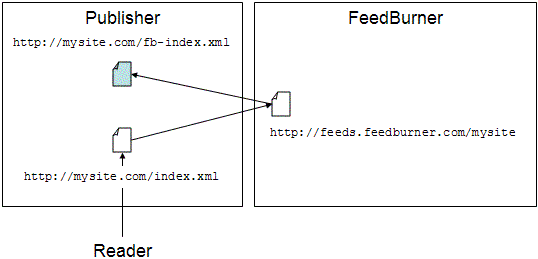
An added bonus: a plugin for self-hosted WordPress installations and feed-specific features within Blogger and TypePad make redirection much easier on these two publishing platforms. - Promote your feeds.feedburner.com feed. This is recommended only in the cases where you are setting up a new blog, or have an existing blog or feed that has no traffic. For example, if your feed is found at http://feeds.feedburner.com/toastforbreakfast, you would change your blog template to link only to this version of the feed. Note you have to make sure to change it not only where you promote your feed directly, but also everywhere you have feed autodiscovery links in your template. (One other place to keep in mind: BrowserFriendly.)
Hopefully, this reminder will help everyone get on firm ground with how to maximize traffic to their feed and revenue from it, too. In future posts, we will be covering how to increase traffic and subscribers to your feed, so hang on to your hat!
New features for advertisers targeting feeds
Labels: Announcements, Feed Placements
Image ads join link units
Label: Adsense | If you use link units, you may have noticed a small addition to the page users see after clicking a link unit topic. We recently added an image ad to the bottom of each of these pages, after our testing showed revenue improvements for many publishers.

These image ads are contextually targeted, based on the link unit topic users clicked to reach the ads. If no image ads are available for the given topic, we'll only show the original text ads -- in other words, we won't show a PSA or insert a blank space in place of the image ad in this case. Advertisers can bid on these image ads on a cost-per-click (CPC) and cost-per-impression (CPM) basis, so you'll generate earnings for valid clicks and impressions. You can review the performance of image ads on your link unit pages by generating a link unit report on your Advanced Reports page.
If you aren't using link units on your pages, we encourage you to give them a try. They don't take up much space and can help add to your AdSense revenue -- learn more in our Help Center, or visit your AdSense Setup tab and select 'AdSense for content' to get started.
Your guide to the Inside AdSense blog
Label: Adsense | Whether you're new to this blog or have been with us since way back in August of aught five, we'd like to provide a few simple tips for effectively using the features provided on our site.
First of all, we've made it easy to subscribe to the blog so that you'll never miss a post. There are a few ways to do so:
- E-mail
Have a Google Account? Then visit our subscription page, or just enter your email address into the yellow box on the right sidebar of this page. You'll be subscribed via Google Groups, and we'll send you a confirmation email. Once you confirm your subscription, you'll begin to see new blog posts in your email inbox. - RSS Reader
After clicking on the 'Site Feed' link in the upper right-hand corner of this page, you'll be taken to a Feedburner URL, which you can access from any RSS Reader or Live Bookmark of your choice. To view all of your feed subscription options, look for the 'Subscribe Now!' box on the right side. - iGoogle
Click the white '+ Google' icon on the top right, and you can receive the latest Inside AdSense updates on your iGoogle page or within Google Reader.

- Labels
Each post is tagged at the bottom with one or more labels that reflect the content of that post. All of these labels are also listed on our sidebar, which you can use to sort through past posts - for instance, click the 'Optimization' label to view all the posts related to optimizing AdSense on your site. You'll notice that this post is tagged with 'Newbie', since that's been our focus on recent Fridays. - "You may have missed..."
This name says it all - check the right sidebar for this section, where we'll be rotating links to useful posts from past months. - Search box
You can search for the topic of your choice using the search box at the top right. Using the tabs on the results page, you can choose whether to search within the AdSense blog or other resources such as our Help Center, the AdSense Forum, and the web.